
What Is My IP — Check My IP Address Instantly
See your public IP address (IPv4 & IPv6), location, ISP and hostname in one second — right from your browser, no install needed.
Your current public IP address IPv4
Location & Network
- Country
- United States
- Region
- Ohio
- City
- Columbus
- Postal code
- 43215
- Time zone
- America/New_York
- ISP / Org
- Amazon.com, Inc.
- ASN
- AS16509
- Latitude / Longitude
- 39.9612, -82.9988
Need a more accurate location?
The location above is an IP-based estimate. GPS-based precise location requires your permission.
※ Approximate GeoIP-based location; it may differ from the actual location. Map data © OpenStreetMap contributors.
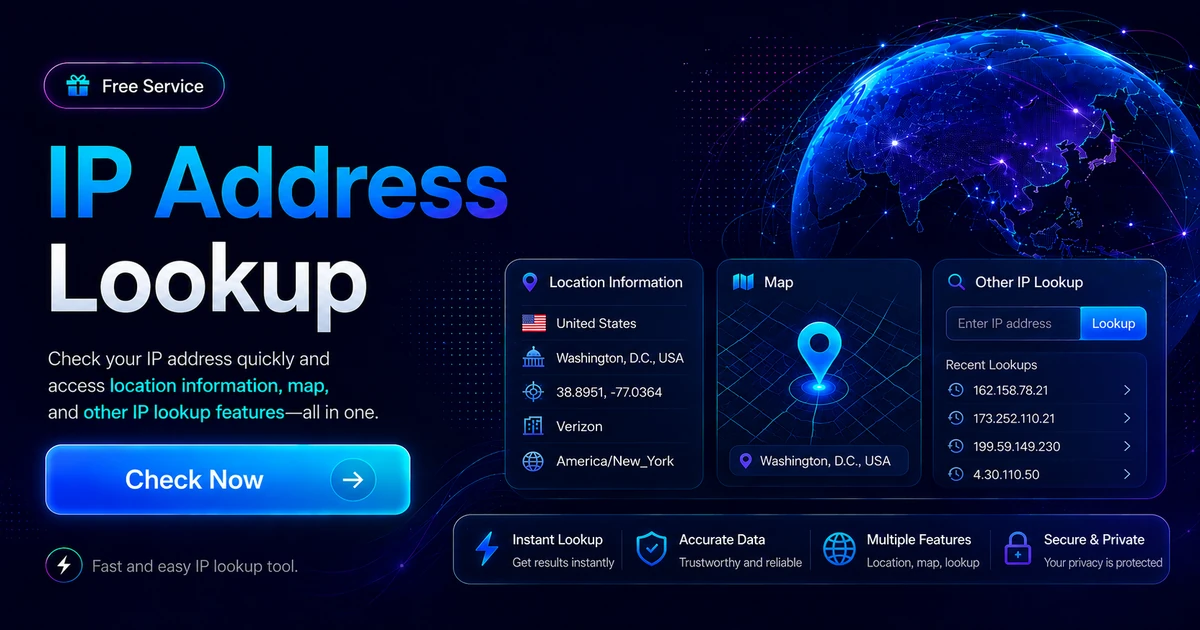
What Is My IP · IP Address Guide
The Complete Guide to Checking My IP IP Address Lookup, Geolocation & the Truth About IP Tracking
From "what is my IP" (public IP) to IPv4 vs IPv6, the difference between public and private IPs, how to check your IP on every OS (Windows CMD ipconfig, macOS, Linux), IP geolocation, WHOIS IP lookup and the real limits of IP tracking — all in one place.
- Last reviewed
- Last reviewed
- Written & reviewed by
- Written & reviewed by MyIP IDC Engineering Team
1 What is an IP Address? (IPv4, IPv6, Public IP vs Private IP)
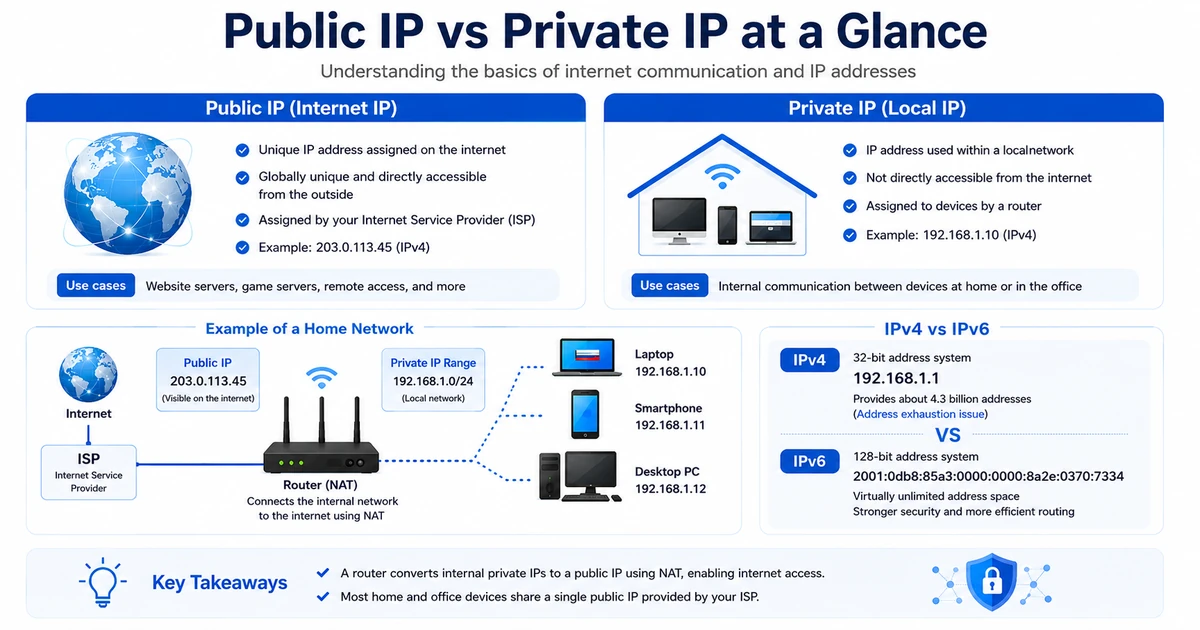
An IP address stands for Internet Protocol address. It is a unique number that every device connected to the Internet uses to identify and communicate with others. Think of it as the phone number your computer uses on the network.
There are two versions: IPv4 and IPv6. IPv4 is a 32-bit number, written in the familiar form 192.168.1.1. IPv6 is 128 bits and provides an enormously larger address space.
IP addresses are assigned by an Internet Service Provider (ISP) and split into public and private IPs. A public IP is directly reachable on the Internet and is globally unique. A private IP is valid only inside your local network — for example, devices behind a home router typically use addresses like 192.168.0.10.
A router takes the single public IP your ISP assigns and shares it with many devices in your home or office through private IPs, so every phone, laptop and TV can reach the Internet at once.
2 How to Check My IP — Using an IP Lookup Site
There are two main ways to find your public IP. The easiest is to open an IP lookup site. The other is to run an OS command (ipconfig, ifconfig, ip addr).
The fastest path is a web lookup. Open the MyIP.co.kr Check My IP page and you will see your public IPv4 and IPv6, location (country & city), carrier (ISP and ASN) and hostname in one view. This works identically on Windows, macOS, Linux, iOS and Android — no install, just a browser.
A command prompt or terminal, on the other hand, also shows your private IP (for example 192.168.x.x), which is essential when troubleshooting your local network. Per-OS instructions follow.
3
Check IP on Windows — the ipconfig CMD command
Windows has several ways to view your IP, but the classic one is Command Prompt. Open the Start menu, type cmd and press Enter. Then run the command below to list every adapter and its assigned IP.
C:\Users\Me> ipconfigThis is very useful when you have multiple adapters (for example wired Ethernet plus Wi-Fi) — each one shows its private IP. If you only need your public IP, the web lookup mentioned above is faster.
On Windows 10 and newer you can also read the IP from the Settings app. Open Settings → Network & Internet → Status, then click Network and Sharing Center. Click your active connection to see the full details including IP. This UI is friendlier if you prefer a GUI to the command line.
4
Check IP on macOS — System Settings & Terminal ipconfig getifaddr
- Click the Apple icon in the top menu bar and choose System Settings.
- In the Settings window, select Network. You will see the list of currently connected networks.
- Select the active network and click the Details (or Advanced) button to view full network info including the IP address.
Check your IP from the Terminal. When you are on Wi-Fi, the interface is usually en0.
$ ipconfig getifaddr en0If you are on wired Ethernet:
$ ipconfig getifaddr en1
5
Check IP on Linux — ip addr and hostname -I
On most modern Linux distributions (Ubuntu, CentOS, Rocky, Debian and others), the ip command from the iproute2 package is the standard tool. (The older ifconfig only works if you install net-tools separately.)
$ ip addr6 IP Geolocation — How Accurate Is It, Really?
IP location is estimated by combining the IP range, the carrier registration data and a GeoIP database. Country and region are usually accurate, but narrowing down to a street address is essentially impossible for the general public.
- Country & region (e.g. New York, California, Texas) — GeoIP accuracy is ~99% at the country level and ~75% at the city level
- ISP & ASN — identifies the carrier (Comcast, AT&T, Verizon, T-Mobile, etc.)
- Coordinates & time zone — latitude/longitude is registration-based and may be off by several to dozens of kilometers
- Corporate or institutional IPs — some companies and universities publish registration data and can be identified
If you need an accurate GPS location, use the "Show my precise location" button at the top of the page. It uses the browser navigator.geolocation API to read GPS, Wi-Fi and cellular signals (with your permission).
7 WHOIS IP Lookup — ARIN, RIPE, APNIC and the Other RIRs
A WHOIS IP lookup reveals the official registrant of an IP block — typically the ISP, organisation or country. The world is divided among five RIRs (Regional Internet Registries), each running its own WHOIS service.
- North America — ARIN WHOIS (United States & Canada)
- Europe, Middle East & Central Asia — RIPE NCC WHOIS
- Asia-Pacific — APNIC WHOIS (Japan, Korea, China, SE Asia, Australia)
- Latin America & Caribbean — LACNIC RDAP · Africa — AFRINIC WHOIS
- Korea (national registry) — KISA KRNIC WHOIS
Use the Lookup another IP section on this page to instantly query an IP or domain — the result merges country, carrier and ASN data from the channels above. Foreign IP lookups work exactly the same way.
8 How to Change Your Public IP — Router Reboot, MAC Spoofing, VPN
There are situations where you genuinely need to change your IP — solving a network issue, or working around a website that has blocked an address. Anyone who has run a small game server long enough has cycled through several public IPs, and the practical playbook below comes from that experience.
The most official way is to ask your ISP. They control the public IP and can release/reassign one. That can be slow, however, so a faster approach is to simply power-cycle your home router. On most ISPs with dynamic IP, this gives you a new public IP within a few minutes.
- Power off the router, wait, then power it back on.
- Check your IP and confirm it has changed.
- If it has not changed, try spoofing the router's MAC address — some ISPs key the IP off the WAN MAC.
You can also change your apparent IP through a VPN. A VPN routes you through a server in another region, which gives you that region's IP and offers extra privacy along the way.
9 IP Tracking — Truth and Misconceptions: Can Someone Find Your Home?
A common myth is that "with your IP, anyone can pinpoint your home address and identity instantly." In reality this is rarely true. An IP is just network metadata for a device; what a regular user can derive is usually limited to country, region and ISP. Tying it to a person typically requires cooperation from the carrier or law enforcement.
On top of that, VPNs, proxies and public Wi-Fi can make the visible IP completely different from the user's real location, which destroys tracking accuracy.
The opposite claim — "IP tracking is completely impossible" — is also false. In cybercrime investigations, access logs, server records and account data are correlated to identify users.
In short: IP tracking is useful for partial information, but it is nothing like the movies where a few seconds of typing reveal a full identity.
My Browser & Connection
Information about your device that any website can see just from your visit.
- Operating system
- …
- Browser
- …
- Language
- …
- Screen resolution
- …
- Browser window
- …
- Pixel ratio
- …
- CPU cores
- …
- Memory
- …
- Time zone
- …
- Cookies
- Do Not Track
- …
- Touch input
- …
- Automation detected
- …
WebRTC Leak Test
Checks whether WebRTC exposes your real IP even when using a VPN/proxy.
Testing…
Look Up Another IP / Domain
Enter an IP address or domain to look up its location and hostname.
Mail Blacklist (RBL) Check
Check whether a mail server IP is listed on major spam blacklists. (IPv4)
Frequently Asked Questions
How do I check my public IP address?
What is the difference between a public IP and a private IP?
Is the IP shown on an IP-check site actually my computer's IP?
Can my exact location be identified from my IP address?
Why does my IP address keep changing?
Why does my IP address look different on Wi-Fi versus mobile data?
Does using a VPN change the result on an IP-check page?
Can my personal information leak from my IP address alone?
How can I change my IP address?
What is the difference between IPv4 and IPv6?
Recommended Servers
Discover affordable server hosting and game servers.

![[인텔 12세대] i3-12100 4코어 8스레드 + 내장 GPU, RAM 32GB, NVME 500GB](/partner/2024/12/15/i3_12100-001.png)


Reviews
IP 주소 찾기 잘 되는거 같네요.. 좋아요~